
Sales invoices
Due-date view
- Party and invoice reference
- Due date and amount
- Upcoming and overdue status
THE PRODUCT
TallyDues is a Windows desktop add-on for TallyPrime. Review due invoices and PDC maturity dates in a focused dashboard and receive reminders on the same computer.
Load the TDL add-on and open its due-date dashboard.
Windows notifications surface dates that need attention.
TallyDues focuses on upcoming and overdue payments. It does not replace the accounting record in TallyPrime.
Due-date view
Maturity view
The system design describes local processing inside the TallyPrime and Windows environment, without a cloud account or data upload.
See the local workflow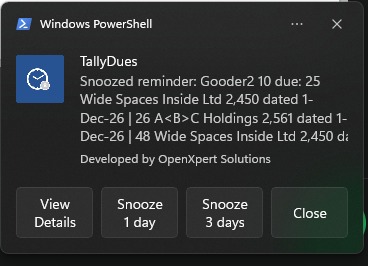
WINDOWS 10/11 · 64-BIT
Set the date range for invoice and cheque items, review them in TallyPrime, and receive desktop alerts with a pop-up fallback when Windows notifications are unavailable.
Read the setup guideProduct documentation describes no cloud service, account, or telemetry.
Configure days back and ahead for invoices and cheques.
Supported environment: TallyPrime Release 7 or later on Windows 10/11 64-bit.